Everything a hockey parent needs
-
Live game stat tracking
One-tap skater and goalie stat entry with auto-save — goals, assists, shots, saves, faceoffs, and more, recorded as the game happens.
-
Season history by team & level
Organize multiple seasons for your players so every year stays in context.
-
Automatic schedule & scoresheet import
Photograph a schedule or scoresheet and the games import automatically — less typing, more watching hockey.
-
Shareable hockey stat cards
Generate polished, trading-card-style game and season stat cards ready to post or send — four premium designs included.
My Player Page in action


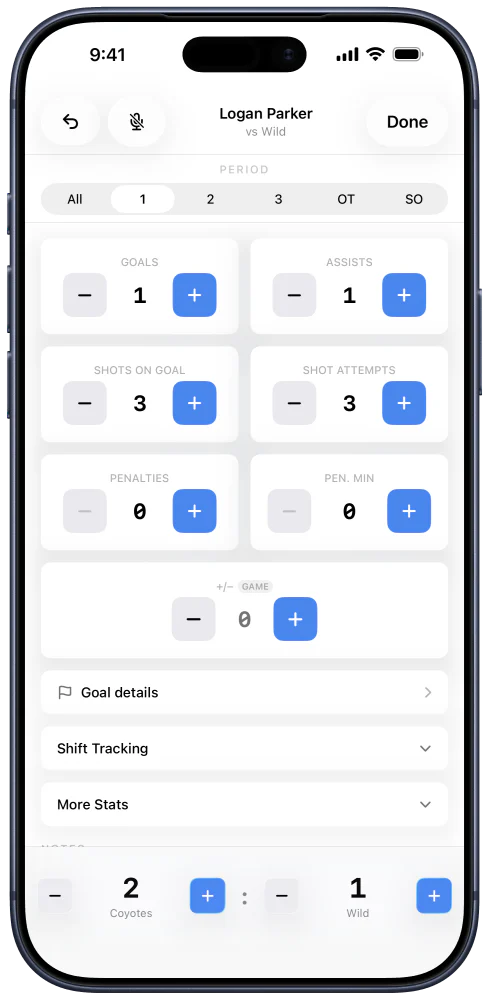
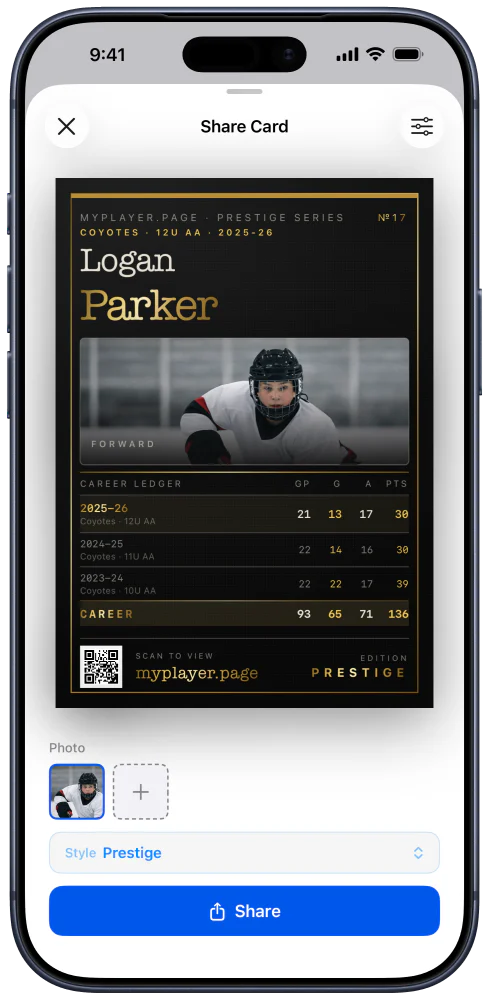

Many ways to share the moment
Post a full player card, recap a season, celebrate a game, or share a video highlight. Choose from different trading card styles for the moment you want to send.


Youth hockey stat tracking, answered
- Is there an app where I can log hockey stats for my kid?
- Yes — My Player Page is a youth hockey stats app built for parents, free to download on iPhone and Android. You enter your child's stats from the stands as the game happens, and the app keeps a running record of every game and season.
- How do I keep track of my child's hockey season?
- My Player Page stores your child's whole hockey season in one place: the game schedule, per-game stats, running season totals, and photos or videos from each game. Seasons are organized by team and level, so multiple years stay in context as your player moves up.
- Can I track both skater and goalie stats?
- Yes. My Player Page tracks goals, assists, shots, faceoffs, penalties, and shifts for skaters, plus saves, shots against, goals against, and save percentage for goalies. A player who does both can be tracked either way, game by game.
- Is there an app just for youth hockey goalie stats?
- My Player Page handles goalies as a first-class case, not an afterthought — saves, shots against, goals against, save percentage, and goals-against average, with the save math checked as you enter it so the numbers can't drift out of balance. It's free on iPhone and Android.
- Is this a team management app?
- No. My Player Page is built for a parent following one child's hockey journey — there are no rosters, no team messaging, and no coach tools. That focus is why live entry stays fast and the season record stays personal. It works alongside whatever team app your league already uses.
- Can it import hockey schedules and scoresheets?
- Yes. Photograph a paper schedule or a game scoresheet and My Player Page turns it into games and stats automatically, so you're not retyping a season's worth of dates or a scoresheet's worth of numbers.
- Is My Player Page free?
- Yes, My Player Page is free to download and free to use for one player, with unlimited games, your full season history, season totals, photos and videos, calendar export, and read-only stat sharing with coaches. An optional premium upgrade adds extra players, co-parent sharing, unlimited schedule and scoresheet imports, advanced stat breakdowns, and additional stat-card designs.
- Does it work on both iPhone and Android?
- Yes. My Player Page is available for iPhone on the App Store and for Android on Google Play, and both versions track the same skater and goalie stats.
- Can I share my kid's hockey stats with family?
- Yes. My Player Page generates trading-card-style stat cards for a single game, a full season, or a player's career, which you can post or send to family after a game.
- Can both parents track the same player?
- Yes. My Player Page has co-parent sharing: you send an invite link, and once it's accepted both parents can view and enter stats for the same player, with changes appearing on both phones in real time. It works between iPhone and Android, and a player can have up to five co-parents. Co-parent sharing is part of the premium upgrade.
- Can I share my kid's stats with their coach?
- Yes, and it's free. My Player Page lets you send a coach a read-only invite link — they can see the player's games, stats, and season totals, but can't change anything, and you can revoke access at any time. A player can have up to five coaches. Coach sharing is free on both iPhone and Android; co-parent sharing, which adds edit access, is the premium version of the same feature.
- Where can I download My Player Page?
- My Player Page is available for iPhone on the App Store and for Android on Google Play, or from myplayer.page.
Track your player's next game
Download My Player Page free for iPhone or Android.